 OKRunit
Plans & Billing
OKRunit offers plans for teams of every size, from solo developers experimenting with AI agents to enterprises with complex approval workflows.
Free
Pro
Business
Enterprise
Which plan is right for you?
Free
Perfect for trying out OKRunit. 50 approval requests per month, 2 connections, and 3 team members. Email notifications included.
Pro — most popular
For growing teams that need Slack notifications, multi-step approvals, basic routing rules, and full analytics. 1,000 requests per month.
Business
For organizations that need advanced routing, trust-based auto-approval, IP allowlists, geo restrictions, and the four-eyes principle. 10,000 requests per month.
Enterprise
Unlimited everything, SSO/SAML, SLA guarantees, and a dedicated customer success manager. Contact us for custom pricing.
Feature comparison
| Feature | Free | Pro | Business | Enterprise |
|---|---|---|---|---|
| Approval requests / month | 50 | 1,000 | 10,000 | Unlimited |
| Connections | 2 | 10 | 50 | Unlimited |
| Team members | 3 | 10 | 50 | Unlimited |
| Webhook callbacks | Yes | Yes | Yes | Yes |
| Email notifications | Yes | Yes | Yes | Yes |
| Slack notifications | -- | Yes | Yes | Yes |
| Multi-step approvals | -- | Yes | Yes | Yes |
| Approval rules & auto-routing | -- | Basic | Advanced | Advanced |
| Trust-based auto-approval | -- | -- | Yes | Yes |
| Audit log retention | 7 days | 90 days | 1 year | Custom |
| Analytics & reporting | Basic | Full | Full | Full + custom |
| Export (CSV / JSON) | -- | Yes | Yes | Yes |
| IP allowlist | -- | -- | Yes | Yes |
| Geo restrictions | -- | -- | Yes | Yes |
| Four-eyes principle | -- | -- | Yes | Yes |
| SSO / SAML | -- | -- | -- | Yes |
| SLA guarantees | -- | -- | -- | Yes |
| Dedicated support | Community | Priority email | Dedicated CSM | |
| Rate limit (per connection) | 60/hr | 500/hr | 5,000/hr | 10,000/hr |
How to upgrade or change your plan
- 1Go to Billing in the dashboard sidebar.
- 2You'll see your current plan, usage stats, and available plans.
- 3Click Upgrade or Change Plan on the plan you want.
- 4Complete checkout via Stripe. Upgrades take effect immediately.
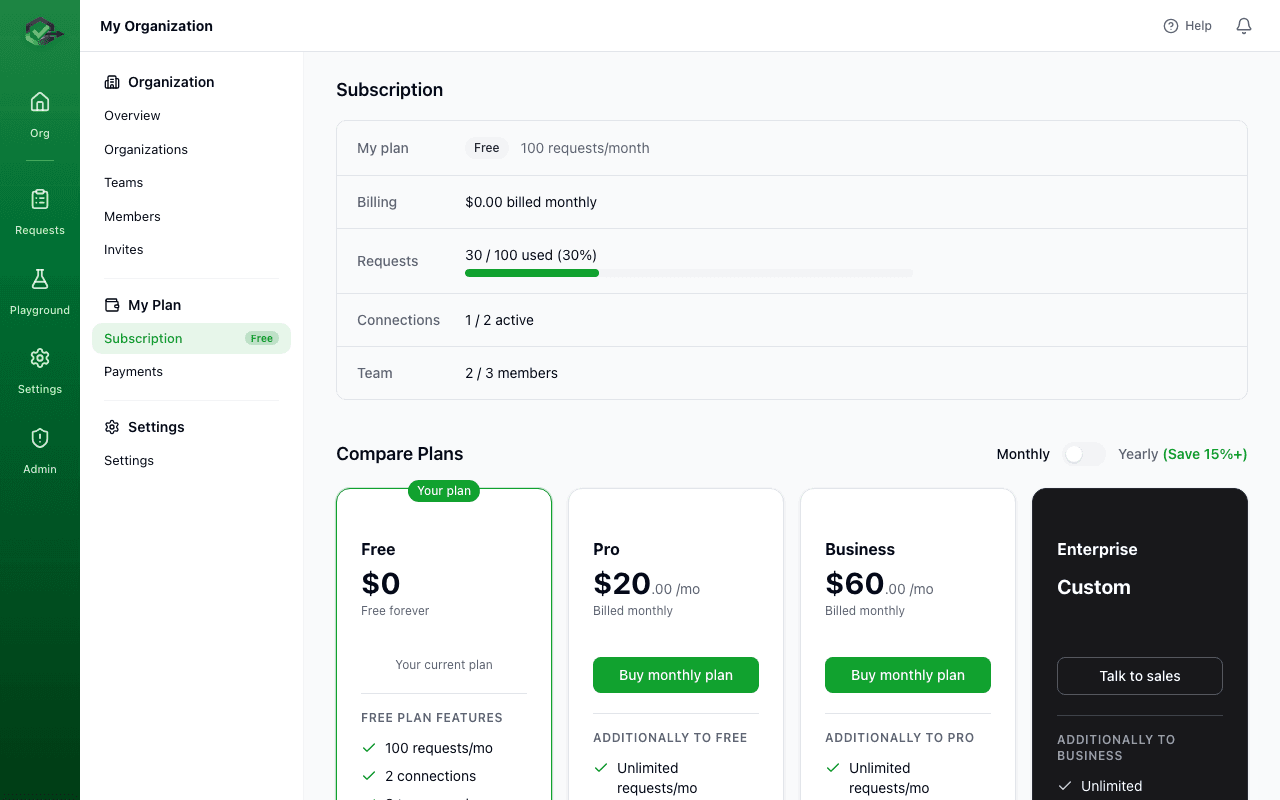
Upgrades take effect immediately, and you are billed a prorated amount for the remainder of your billing cycle. Downgrades take effect at the end of the current billing period. Your existing data and configuration are preserved, but you may lose access to features not included in the lower plan.
Usage limits
When you reach your plan's monthly approval request limit:
- At 80% (soft limit): You receive an email notification. All features continue working normally.
- At 100% (hard limit): New approval requests via the API return a
402 Payment Requirederror. Existing pending requests can still be approved or rejected. Dashboard access is unaffected. - 48-hour grace period: You have 48 hours to upgrade before the hard limit is enforced, giving you time to upgrade without disrupting active workflows.
Check your usage via API
curl https://okrunit.com/api/v1/org/usage \
  -H "Authorization: Bearer gk_your_api_key"

// Response
{
  "plan": "pro",
  "requests_used": 742,
  "requests_limit": 1000,
  "connections_used": 4,
  "connections_limit": 10,
  "members_count": 6,
  "members_limit": 10,
  "billing_period_start": "2026-03-01T00:00:00.000Z",
  "billing_period_end": "2026-03-31T23:59:59.999Z"
}
Frequently asked questions
What counts as an approval request?
Each call to POST /api/v1/approvals that creates a new request counts as one. Idempotent retries (same idempotency_key) do not count again. Requests created via platform integrations (Zapier, Make, etc.) count the same way.
Do cancelled or expired requests count?
Yes, all created requests count toward your monthly limit regardless of their final status.
Can I pay annually?
Yes. Annual billing is available for Pro and Business plans with a 20% discount. Toggle monthly/yearly on the billing page.
What payment methods do you accept?
We accept all major credit cards via Stripe. Enterprise customers can pay via invoice with NET-30 terms.
Is there a free trial for paid plans?
The Free plan is available indefinitely. For Pro and Business, we offer a 14-day free trial with no credit card required.
How do I view my invoices?
Go to Payments in the dashboard to view and download all invoices.
Need Enterprise features?
Get SSO/SAML, custom SLAs, dedicated support, and unlimited usage. Contact us for a custom quote tailored to your organization.
Contact sales